
WELCOME
Welcome to the VMS Fish Database, a tool designed to support the zebrafish research community with streamlined data management for fish facilities. Zebrafish are widely used in developmental biology, disease modeling, and tissue regeneration research. However, a freely available and user-friendly zebrafish husbandry management application has been lacking. The VMS Fish Database fills this gap by helping you organize essential information related to zebrafish husbandry, tracking, and facility upkeep. This open-source application is a robust, error-free option for individual users, small laboratories, and large consortia managers.
You have flexible options for setting up and accessing the VMS Fish Database. You can either upload it to the shinyapps.io cloud platform for convenient remote access and collaboration or download and install it on your local device. Step-by-step instructions for deploying it online are provided under the tab 'DEPLOY ONLINE'. To install the app locally, refer to the third tab on this website, 'DOWNLOAD & INSTALL'. For demonstration purposes and a free trial of database functionality, a sample VMS-Fish is available under the tab 'VIGNETTE'. If you are an experienced R/Shiny user, visit the tab 'ARCHIVE' to download a customizable deployment package that includes the source code of VMS-Fish database.
The VMS Fish Database includes two default accounts: an administrator account (Username: Administrator) and a standard account (Username: User1). Currently, both accounts share the default password: zebrafish.
Cite Us
If you find this database useful, please cite it using the following reference:
Muraleedharan, Saraswathy V., & Mokalled, M. H. VMS-Fish: A Comprehensive Application for Zebrafish Husbandry Management. Zebrafish, (2025). https://doi.org/10.1089/zeb.2024.0183
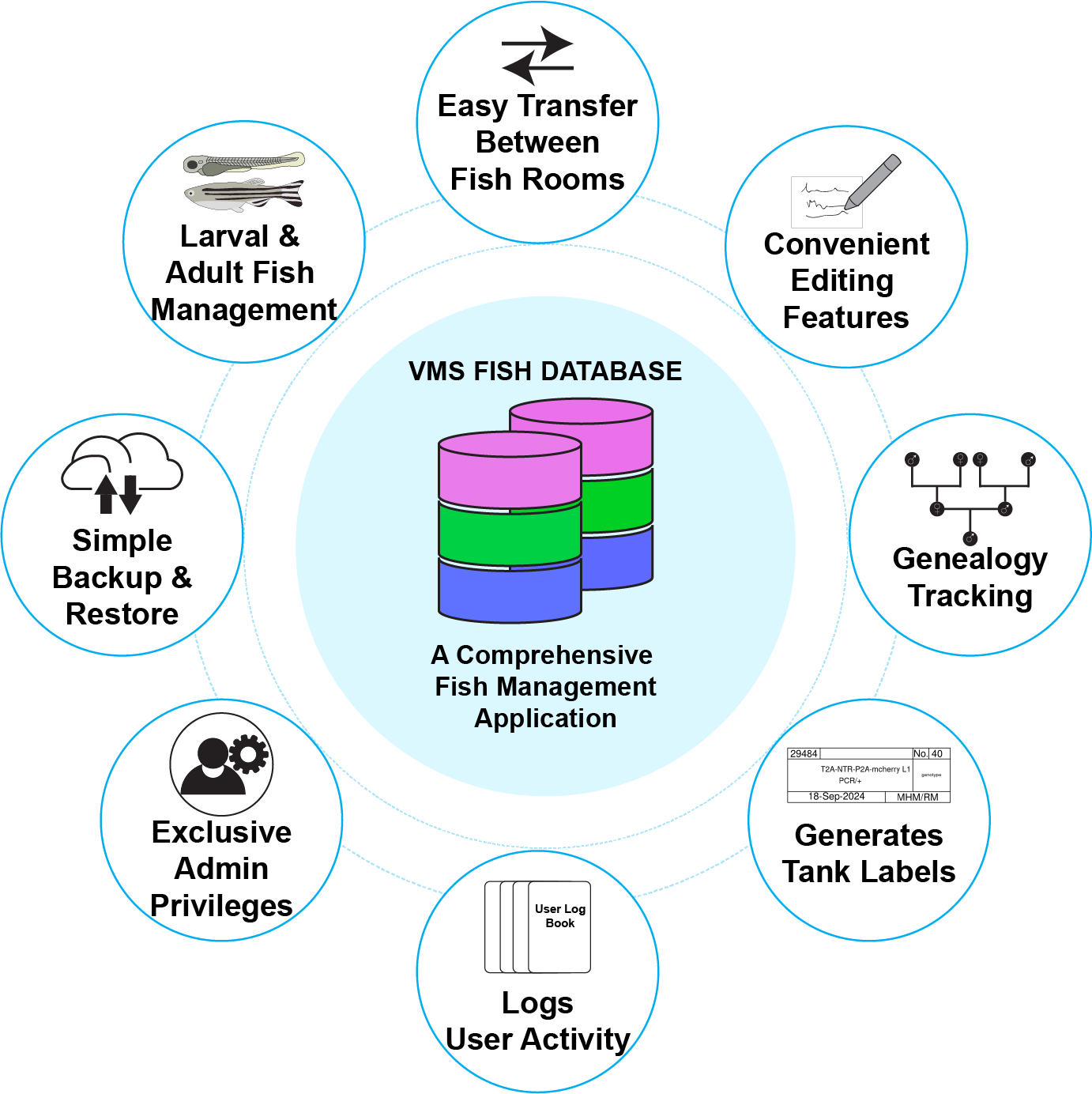
FEATURES OF VMS FISH DATABASE (v1.4.2)
© 2024 Washington University in St. Louis. All rights reserved.
v1.4.2 last updated: 15-December-2024. This database is powered using Shiny and R
By using this software, you agree to the Washington University in St. Louis (Washington University) Software License. Washington University Software License: Copyright Notice: ©2024 Washington University in St. Louis. Washington University hereby grants to you a non-transferable, non-exclusive, royalty-free, non-commercial, non- clinical, not-for-use with human subjects, research license to use and copy the computer code that may be downloaded within this site (the “Software”). You agree to include this license and the above copyright notice in all copies of the Software. The Software may not be distributed, shared, or transferred to any third party. This license does not grant any rights or licenses to any other patents, copyrights, or other forms of intellectual property owned or controlled by Washington University. YOU AGREE THAT THE SOFTWARE PROVIDED HEREUNDER IS EXPERIMENTAL AND IS PROVIDED “AS IS”, WITHOUT ANY WARRANTY OF ANY KIND, EXPRESSED OR IMPLIED, INCLUDING WITHOUT LIMITATION WARRANTIES OF MERCHANTABILITY OR FITNESS FOR ANY PARTICULAR PURPOSE, OR NON-INFRINGEMENT OF ANY THIRD-PARTY PATENT, COPYRIGHT, OR ANY OTHER THIRD-PARTY RIGHT. IN NO EVENT SHALL THE CREATORS OF THE SOFTWARE OR WASHINGTON UNIVERSITY BE LIABLE FOR ANY DIRECT, INDIRECT, SPECIAL, OR CONSEQUENTIAL DAMAGES ARISING OUT OF OR IN ANY WAY CONNECTED WITH THE SOFTWARE, THE USE OF THE SOFTWARE, OR THIS AGREEMENT, WHETHER IN BREACH OF CONTRACT, TORT OR OTHERWISE, EVEN IF SUCH PARTY IS ADVISED OF THE POSSIBILITY OF SUCH DAMAGES.
DEPLOY VMS FISH DATABASE (v1.4.2) ON THE SHINYAPPS.IO SERVER
Step 1: Give permission to the VMS FISH DATABASE for storing data in your google drive.
READ ME: IMPORTANT !
To deploy the VMS Fish Database on the shinyapps.io server, you must grant the app permission to store information on your Google Drive. Upon clicking the START DEPLOYMENT button, a new browser window will open, prompting you to sign into the Google Drive account where you want to store the data. Follow the steps to grant the app permission to read, write, and delete Google Drive files created by it. Ensure you check the option to create, edit, and delete files during this process.
Once authentication is complete, a new button labeled
PREPARE FOR DEPLOYMENT
will appear. Click this button to verify
the authentication. This action will create a folder named
vmsfishdbdata_DO_NOT_DELETE_OR_MODIFY
on your Google Drive,
containing files associated with the VMS Fish Database. This process may take up to a minute. Note that the app will not have permission
to modify any other folder in your drive.
After the file creation is successfully completed, instructions to deploy the app on the shinyapps.io server will appear. Follow these instructions, then click the CONNECT ACCOUNT button, followed by the DEPLOY button. This will initiate the deployment process, which may take up to five minutes.
NOTE: You should not block pop-up windows in your browser, otherwise authentication will fail resulting in the error: 'no token found!'
This might take upto 1 minute.
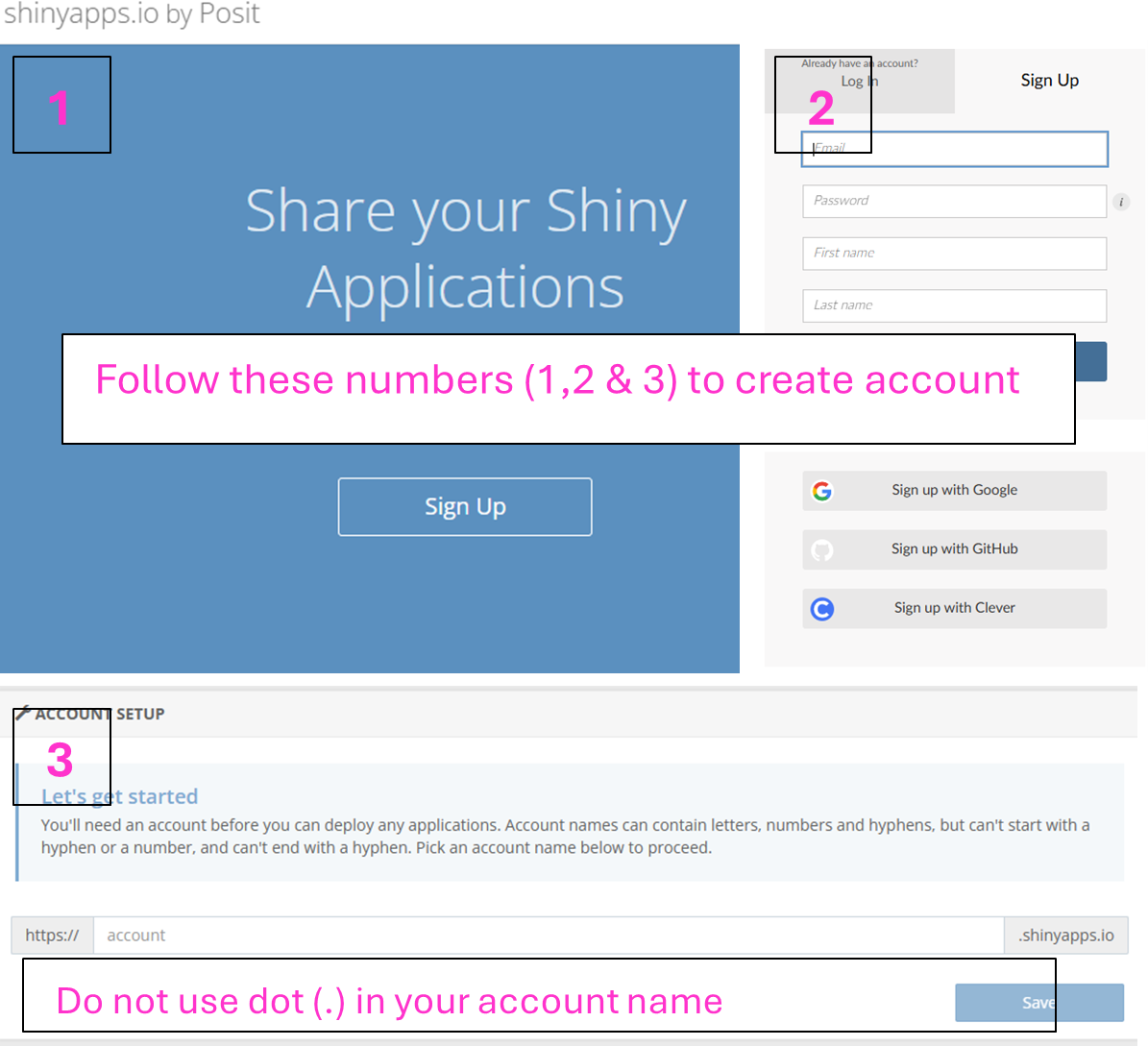
Step 2: Create an account in shinyapps.io, get token and deploy.
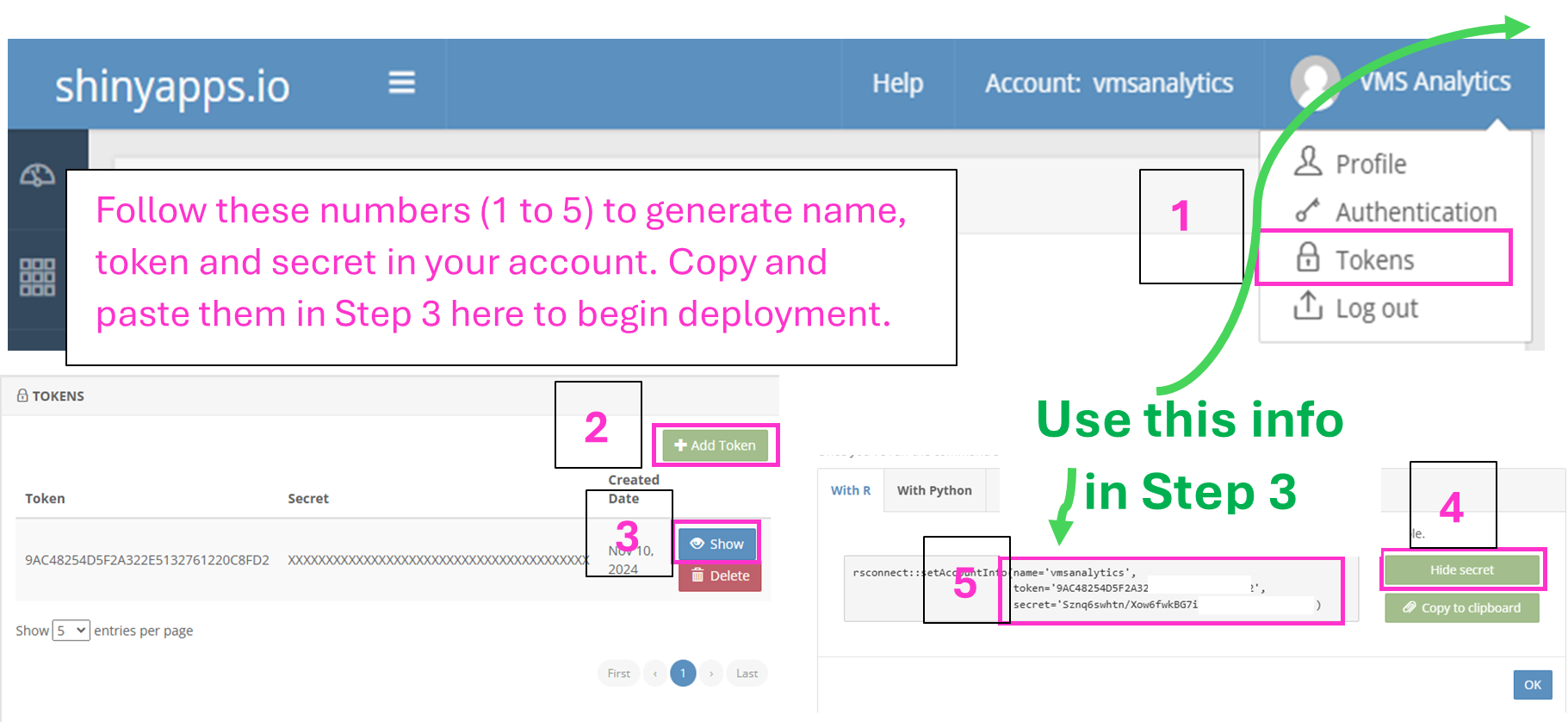
Step 2.3: Paste here to start deploying
*All fields are mandatory.
Watch video tutorial for online deployment of VMS-Fish
© 2024 Washington University in St. Louis. All rights reserved.
v1.4.2 last updated: 15-December-2024. This database is powered using Shiny and R
By using this software, you agree to the Washington University in St. Louis (Washington University) Software License. Washington University Software License: Copyright Notice: ©2024 Washington University in St. Louis. Washington University hereby grants to you a non-transferable, non-exclusive, royalty-free, non-commercial, non- clinical, not-for-use with human subjects, research license to use and copy the computer code that may be downloaded within this site (the “Software”). You agree to include this license and the above copyright notice in all copies of the Software. The Software may not be distributed, shared, or transferred to any third party. This license does not grant any rights or licenses to any other patents, copyrights, or other forms of intellectual property owned or controlled by Washington University. YOU AGREE THAT THE SOFTWARE PROVIDED HEREUNDER IS EXPERIMENTAL AND IS PROVIDED “AS IS”, WITHOUT ANY WARRANTY OF ANY KIND, EXPRESSED OR IMPLIED, INCLUDING WITHOUT LIMITATION WARRANTIES OF MERCHANTABILITY OR FITNESS FOR ANY PARTICULAR PURPOSE, OR NON-INFRINGEMENT OF ANY THIRD-PARTY PATENT, COPYRIGHT, OR ANY OTHER THIRD-PARTY RIGHT. IN NO EVENT SHALL THE CREATORS OF THE SOFTWARE OR WASHINGTON UNIVERSITY BE LIABLE FOR ANY DIRECT, INDIRECT, SPECIAL, OR CONSEQUENTIAL DAMAGES ARISING OUT OF OR IN ANY WAY CONNECTED WITH THE SOFTWARE, THE USE OF THE SOFTWARE, OR THIS AGREEMENT, WHETHER IN BREACH OF CONTRACT, TORT OR OTHERWISE, EVEN IF SUCH PARTY IS ADVISED OF THE POSSIBILITY OF SUCH DAMAGES.
DOWNLOAD & INSTALL FISH DATABASE (v1.4.2) LOCALLY IN YOUR MACHINE
READ ME: Instructions
Click the DOWNLOAD button to download the appropriate installer for your device. Currently, options are available for both Windows and Mac.
For Windows machines (x86_64-w64-mingw32/x64 (64-bit)), the installer is provided as a compressed zip file. After downloading, extract the zip file, then double-click the installer (.exe) and follow the on-screen instructions. Once the installation is complete, click the desktop icon for the VMS Fish Database to launch the app in your web browser.
For Mac OS (x86_64-apple-darwin17.0 (64-bit)), you will download a compressed folder. Extract the folder to the location where you want the Fish Database to run and store data. Follow the instructions in the README file, then double-click the `vmsfishdb_launch.command` file to launch the application.
DOWNLOAD WINDOWS INSTALLER
DOWNLOAD MAC INSTALLER
Watch video tutorial for installation of VMS-Fish on Windows devices
DOWNLOAD & INSTALL FISH DATABASE (v1.4.2) ON ANY DEVICE THROUGH DOCKER
READ ME: Instructions
If the above installers are not compatible with your machine's platform, you can use a Docker image of the VMS Fish Database, available on Docker Hub at: vishnums007/vmsfishdb_app:latest . Docker provides a containerized solution to run the application, making it platform-independent.
To use the Docker image, ensure Docker Desktop is installed and running on your device. Docker Desktop is available for Windows, macOS, and Linux. Once installed, you can pull and run the VMS Fish Database Docker image using the deployment commands provided below.
Step 1: Download & Install Docker Desktop .
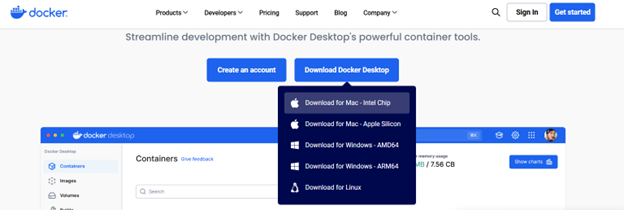
Step 2: Download the Docker deployer for your operating system.
DOWNLOAD MAC DOCKER DEPLOYERDOWNLOAD WINDOWS DOCKER DEPLOYER
Watch video tutorial for Docker installation of VMS-Fish
© 2024 Washington University in St. Louis. All rights reserved.
v1.4.2 last updated: 15-December-2024. This database is powered using Shiny and R
By using this software, you agree to the Washington University in St. Louis (Washington University) Software License. Washington University Software License: Copyright Notice: ©2024 Washington University in St. Louis. Washington University hereby grants to you a non-transferable, non-exclusive, royalty-free, non-commercial, non- clinical, not-for-use with human subjects, research license to use and copy the computer code that may be downloaded within this site (the “Software”). You agree to include this license and the above copyright notice in all copies of the Software. The Software may not be distributed, shared, or transferred to any third party. This license does not grant any rights or licenses to any other patents, copyrights, or other forms of intellectual property owned or controlled by Washington University. YOU AGREE THAT THE SOFTWARE PROVIDED HEREUNDER IS EXPERIMENTAL AND IS PROVIDED “AS IS”, WITHOUT ANY WARRANTY OF ANY KIND, EXPRESSED OR IMPLIED, INCLUDING WITHOUT LIMITATION WARRANTIES OF MERCHANTABILITY OR FITNESS FOR ANY PARTICULAR PURPOSE, OR NON-INFRINGEMENT OF ANY THIRD-PARTY PATENT, COPYRIGHT, OR ANY OTHER THIRD-PARTY RIGHT. IN NO EVENT SHALL THE CREATORS OF THE SOFTWARE OR WASHINGTON UNIVERSITY BE LIABLE FOR ANY DIRECT, INDIRECT, SPECIAL, OR CONSEQUENTIAL DAMAGES ARISING OUT OF OR IN ANY WAY CONNECTED WITH THE SOFTWARE, THE USE OF THE SOFTWARE, OR THIS AGREEMENT, WHETHER IN BREACH OF CONTRACT, TORT OR OTHERWISE, EVEN IF SUCH PARTY IS ADVISED OF THE POSSIBILITY OF SUCH DAMAGES.
DEMO ACCOUNT
Welcome to the VMS Fish database demo! We have created a demo account for you to explore the functionalities of the VMS Fish database application. Simply click on the link below to access the demo version hosted on the shinyapps.io server.
Click here to access the DEMO VMS Fish Database.
To log in, please use the following credentials:
Username: Administrator
Password: zebrafish
Note: The demo account is designed for evaluation purposes only. Data and features within this account are for demonstration and please be respectful while using it.
PRIVACY POLICY
Effective Date: 22-November-2024
INTRODUCTION
We value your privacy and are committed to protecting your personal data while you use the VMS FishDatabase application (The App). This Privacy Policy outlines the types of information we collect, how it is used, and the steps we take to safeguard your information.
Data Collection and Usage
- No Collection of Personal Information: We do not collect or store any personal information of users interacting with the App.
- Deployment Tokens: During deployment, the App uses tokens for operational purposes. These tokens are immediately deleted from our servers upon successful deployment. They are not stored or reused after the process is completed.
- Session Logs for Debugging: We retain deployment logs for each session strictly for debugging and improving the performance of the App. These logs do not contain personal information.
-
Google Analytics:
The App uses Google Analytics to monitor and analyze app usage. This may include:
- Aggregated data such as the number of users, session duration, and user interactions within the App.
- General geographical data (e.g., country or region, not specific locations).
- Device and browser information.
How We Use Collected Data
The collected data is used for the following purposes:
- Monitoring App performance.
- Improving functionality and user experience.
- Identifying and resolving technical issues.
Data Sharing
We do not share, sell, or rent any collected data to third parties. Data collected via Google Analytics is processed in accordance with Google’s policies and is not linked to any identifiable personal information.
Data Security
We implement robust technical and organizational measures to ensure the security of the data processed within the App. While we strive to protect all data, no system can be entirely secure. We encourage users to use the App in compliance with their organization’s privacy standards.
Third-Party Services
This App integrates with Google Analytics, a third-party analytics service. By using the App, you consent to the processing of your data by Google as described in their Privacy Policy.
User Rights
Since we do not collect personal information, there is no identifiable data to access, amend, or delete. If you have concerns about data collection via Google Analytics, you can opt-out by using the Google Analytics Opt-Out Browser Add-on.
Policy Updates
We may update this Privacy Policy from time to time. Any changes will be effective immediately upon posting the revised version. Users are encouraged to periodically review this page for the latest information on our privacy practices.
Contact Us
If you have questions or concerns about this Privacy Policy, please contact us at:
- Emails: vishnu@wustl.edu, mmokalled@wustl.edu, vmsanalyticsconsulting@gmail.com
- Address: Washington University School of Medicine in St. Louis, 660 S. Euclid Ave, Cancer Research Building, Room 3600A, St. Louis, MO, 63110, USA.
Washington University Software License
All rights reserved. Copyright © 2024 Washington University in St. Louis
By using this software, you agree to the Washington University in St. Louis (Washington University) Software License.
License Terms
Copyright Notice: ©2024 Washington University in St. Louis.
Washington University hereby grants to you a non-transferable, non-exclusive, royalty-free, non-commercial, non-clinical, not-for-use with human subjects, research license to use and copy the computer code that may be downloaded within this site (the “Software”). You agree to include this license and the above copyright notice in all copies of the Software. The Software may not be distributed, shared, or transferred to any third party. This license does not grant any rights or licenses to any other patents, copyrights, or other forms of intellectual property owned or controlled by Washington University.
Disclaimer
YOU AGREE THAT THE SOFTWARE PROVIDED HEREUNDER IS EXPERIMENTAL AND IS PROVIDED “AS IS”, WITHOUT ANY WARRANTY OF ANY KIND, EXPRESSED OR IMPLIED, INCLUDING WITHOUT LIMITATION WARRANTIES OF MERCHANTABILITY OR FITNESS FOR ANY PARTICULAR PURPOSE, OR NON-INFRINGEMENT OF ANY THIRD-PARTY PATENT, COPYRIGHT, OR ANY OTHER THIRD-PARTY RIGHT.
IN NO EVENT SHALL THE CREATORS OF THE SOFTWARE OR WASHINGTON UNIVERSITY BE LIABLE FOR ANY DIRECT, INDIRECT, SPECIAL, OR CONSEQUENTIAL DAMAGES ARISING OUT OF OR IN ANY WAY CONNECTED WITH THE SOFTWARE, THE USE OF THE SOFTWARE, OR THIS AGREEMENT, WHETHER IN BREACH OF CONTRACT, TORT OR OTHERWISE, EVEN IF SUCH PARTY IS ADVISED OF THE POSSIBILITY OF SUCH DAMAGES.
Archive Section
(FOR EXPERT USERS ) DEPLOY FISH DATABASE ON SHINYAPPS.IO SERVER FROM YOUR OWN MACHINE
READ ME: IMPORTANT !
If you are an experienced user, you can deploy the application from your own device using the deployment package provided below. In this case, instead of VMS Fish Database API accessing your Google Drive, the standard Tidyverse API will be used. Click the DOWNLOAD button to download the deployment package for your device. Packages are available for both Windows (x86_64-w64-mingw32/x64 (64-bit)) and Mac OS (x86_64-apple-darwin17.0 (64-bit)). After downloading the deployment package, extract the files. Inside, you will find a README PDF file with detailed steps to successfully deploy the application to the shinyapps.io server.
DOWNLOAD WINDOWS SERVER DEPLOYERDOWNLOAD MAC SERVER DEPLOYER
Watch video tutorial for deployment of VMS-Fish using your own device
© 2024 Washington University in St. Louis. All rights reserved.
v1.4.2 last updated: 15-December-2024. This database is powered using Shiny and R
By using this software, you agree to the Washington University in St. Louis (Washington University) Software License. Washington University Software License: Copyright Notice: ©2024 Washington University in St. Louis. Washington University hereby grants to you a non-transferable, non-exclusive, royalty-free, non-commercial, non- clinical, not-for-use with human subjects, research license to use and copy the computer code that may be downloaded within this site (the “Software”). You agree to include this license and the above copyright notice in all copies of the Software. The Software may not be distributed, shared, or transferred to any third party. This license does not grant any rights or licenses to any other patents, copyrights, or other forms of intellectual property owned or controlled by Washington University. YOU AGREE THAT THE SOFTWARE PROVIDED HEREUNDER IS EXPERIMENTAL AND IS PROVIDED “AS IS”, WITHOUT ANY WARRANTY OF ANY KIND, EXPRESSED OR IMPLIED, INCLUDING WITHOUT LIMITATION WARRANTIES OF MERCHANTABILITY OR FITNESS FOR ANY PARTICULAR PURPOSE, OR NON-INFRINGEMENT OF ANY THIRD-PARTY PATENT, COPYRIGHT, OR ANY OTHER THIRD-PARTY RIGHT. IN NO EVENT SHALL THE CREATORS OF THE SOFTWARE OR WASHINGTON UNIVERSITY BE LIABLE FOR ANY DIRECT, INDIRECT, SPECIAL, OR CONSEQUENTIAL DAMAGES ARISING OUT OF OR IN ANY WAY CONNECTED WITH THE SOFTWARE, THE USE OF THE SOFTWARE, OR THIS AGREEMENT, WHETHER IN BREACH OF CONTRACT, TORT OR OTHERWISE, EVEN IF SUCH PARTY IS ADVISED OF THE POSSIBILITY OF SUCH DAMAGES.